


Hi, how can we help?
- How to transfer a Location between End Users
- Installation Checklist
- Resolving fallback waiting error (for Installers only)
- How to commission a NexBlue Charge Point
- How to connect charge point to 4G during/after installation
- How to create and manage Locations
- What is a Location and why is it important?
- How to transfer ownership to customer (NexBlue Partner App)
- Phase rotation
- Fallback waiting error
- Where is the pin for my charge point/Zen?
- How to make a charge point tethered (lead stays plugged in)
- How to change brightness of charge point light
- How to add a charge point/load balancer to your Location
- How to commission a NexBlue Charge Point
- How to connect charge point to 4G during/after installation
- RCD Test Procedure
- How to check if a product has been encountering any unexpected behavior
- Residual Current Protection
- Phase rotation
- Connect the NexBlue Zen (Load Balancer) to the NexBlue Cloud
- Fallback waiting error
- Where is the pin for my charge point/Zen?
- Resolving fallback waiting error (for Installers only)
- How to add a charge point/load balancer to your Location
- How to use solar energy to charge your car
- How to check if a product has been encountering any unexpected behavior
- How to Connect the NexBlue Zen (Smart Meter) to Wi-Fi
- Integrate solar panel terminal with Load balancer
- How to add a Location thats been shared with you
- Where is the pin for my charge point/Zen?
- How to share a location with an individual/organisation
- How to create/join/invite someone to an Organisation
- How to connect charge point to 4G during/after installation
- How to carry out a factory reset of a product
- How to create and manage Locations
- How to check if a product has been encountering any unexpected behavior
- Charging status
- Phase rotation
- How to transfer ownership to end customer (Partner Portal)
- Pre-configuration: Remotely complete the installation configuration on the portal
- Does every new installer need to get a username and password?
- How to change the main fuse on the Partner Portal?
- How to transfer a Location between End Users
- How to connect a charger to WiFi
- Exporting charging data
- Connect the NexBlue Zen (Load Balancer) to the NexBlue Cloud
- Fallback waiting error
- Where is the pin for my charge point/Zen?
- How to make a charge point tethered (lead stays plugged in)
- How to change brightness of charge point light
- How to add a charge point/load balancer to your Location
- How to connect to your tariff (EcoPilot)
- How to set max charging current
- How to set the charging schedule
- Someone else wants to use my charge point, how can I share it with them?
- How to use solar energy to charge your car
- How to add a charge point in the myNexBlue App
- How to Connect the NexBlue Zen (Smart Meter) to Wi-Fi
- How to configure single phase charging?
- Charger or Load Balancer Not Connecting via Bluetooth
- Firewall Requirements for NexBlue Charge Points
- Resolving fallback waiting error (for Installers only)
- Why have I received an email alert about my charge point(s)?
- My charge point is switched on but the light on the unit is not on
- RCD Test Procedure
- Event List
- How to check if a product has been encountering any unexpected behavior
Charger or Load Balancer Not Connecting via Bluetooth
Table of Contents
Why isn’t my charger or load balancer connecting via Bluetooth?
The NexBlue app (myNexBlue or Partner) should automatically connect when your phone is nearby. When connected successfully, the Bluetooth icon below the device image will turn blue.
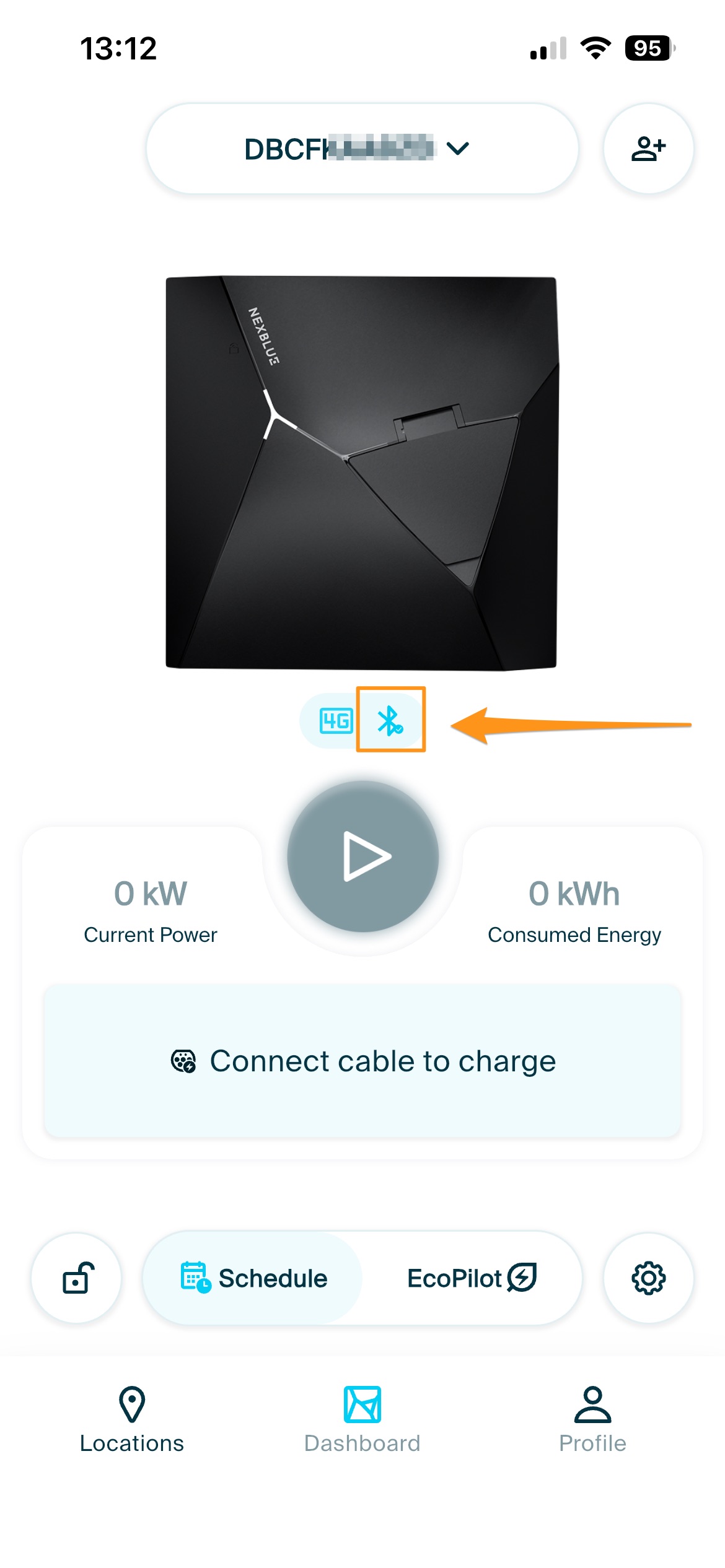
If this isn’t happening, there are a few common reasons.
What could be causing the issue?
- Bluetooth permissions are not enabled for the NexBlue app
- Location access is turned off on your phone
- You are too far away from the device
- The device is not powered on
- The serial number (SN) does not match the device being added
How do I fix Bluetooth connection issues?
Follow these steps to get connected:
1. Check the power supply
Make sure your device is powered on.
If the indicator light does not turn on after connecting to a working power source, please submit a support ticket to NexBlue.
2. Verify app permissions
Go to your phone settings and ensure the NexBlue app has access to:
- Bluetooth
- Location services
Both are required for Bluetooth discovery and connection.
3. Test with another device or phone
Move close to another NexBlue device and check if the Bluetooth icon turns blue.
If it still doesn’t connect:
- Update the app to the latest version
- Recheck app permissions
- Try using a different phone
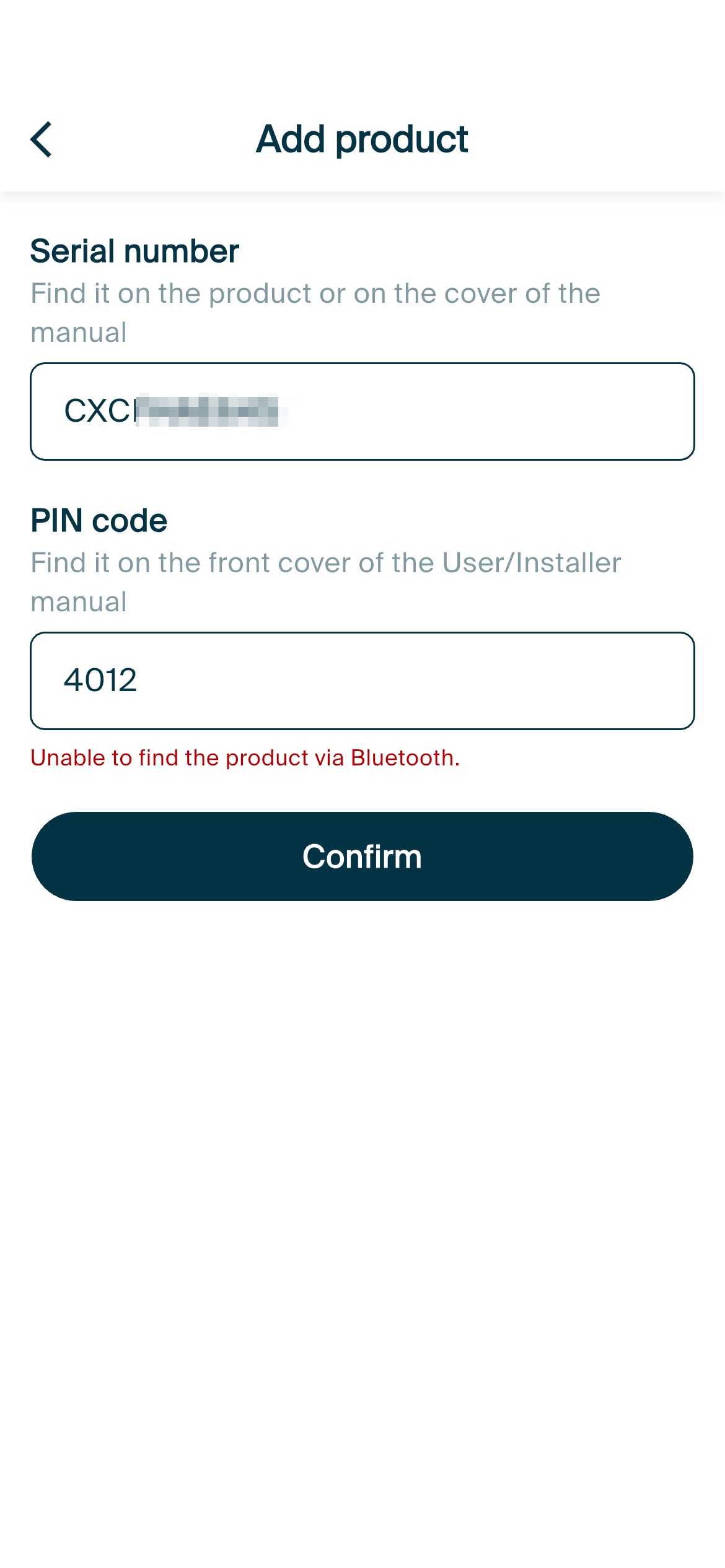
4. Check the serial number (SN)
If you are adding a new device:
- Confirm the serial number on the device matches the one in the user manual
If they don’t match:
- Take a photo of both serial numbers
- Submit a support ticket to NexBlue
Our team will help you with the correct PIN and setup.
Updated on 18 May 2026