


Hej, hvordan kan vi hjælpe?
- Sådan overføres en placering mellem slutbrugere
- Installationscheckliste
- Løsning af fejl ved ventetid ved tilbagefald (kun for installatører)
- Sådan bestiller du en Point
- Sådan tilsluttes ladestationen til 4G under/efter installationen
- Sådan oprettes og administreres placeringer
- Hvad er en placering, og hvorfor er den vigtig?
- Sådan overføres ejerskabet til kunden (NexBlue App)
- Fasevridning
- Ventetid for fejl
- Hvor er stikket til min ladZen?
- Sådan gør du en ladestation fast tilsluttet (ledningen forbliver tilsluttet)
- Sådan ændres lysstyrken på ladestationens lys
- Sådan tilføjer du et opladningspunkt/en belastningsbalancer til din placering
- Sådan bestiller du en Point
- Sådan tilsluttes ladestationen til 4G under/efter installationen
- RCD-testprocedure
- Sådan kontrolleres det, om et produkt har udvist uventet adfærd
- Reststrømsbeskyttelse
- Fasevridning
- Tilslut NexBlue Zen Load Balancer) til NexBlue
- Ventetid for fejl
- Hvor er stikket til min ladZen?
- Løsning af fejl ved ventetid ved tilbagefald (kun for installatører)
- Sådan tilføjer du et opladningspunkt/en belastningsbalancer til din placering
- Sådan bruger du solenergi til at oplade din bil
- Sådan kontrolleres det, om et produkt har udvist uventet adfærd
- Sådan tilsluttes NexBlue Zen smart måler) til Wi-Fi
- Integrer solcellepanelterminal med belastningsbalancer
- Sådan tilføjer du en placering, der er blevet delt med dig
- Hvor er stikket til min ladZen?
- Sådan deler du en placering med en person/organisation
- Sådan opretter/tilmelder du dig/inviterer nogen til en organisation
- Sådan tilsluttes ladestationen til 4G under/efter installationen
- Sådan udfører du en fabriksindstilling af et produkt
- Sådan oprettes og administreres placeringer
- Sådan kontrolleres det, om et produkt har udvist uventet adfærd
- Opladningsstatus
- Fasevridning
- How to transfer ownership to end customer (Partner Portal)
- Forudgående konfiguration: Fjernbetjent færdiggørelse af installationskonfigurationen på portalen
- Skal alle nye installatører have et brugernavn og en adgangskode?
- Hvordan skifter man hovedsikringen på Partnerportalen?
- Sådan overføres en placering mellem slutbrugere
- Sådan tilsluttes en oplader til WiFi
- Eksport af opladningsdata
- Tilslut NexBlue Zen Load Balancer) til NexBlue
- Ventetid for fejl
- Hvor er stikket til min ladZen?
- Sådan gør du en ladestation fast tilsluttet (ledningen forbliver tilsluttet)
- Sådan ændres lysstyrken på ladestationens lys
- Sådan tilføjer du et opladningspunkt/en belastningsbalancer til din placering
- Sådan opretter du forbindelse til din takst (EcoPilot)
- Sådan indstilles maksimal ladestrøm
- Sådan indstilles opladningsplanen
- En anden person ønsker at benytte min ladestation. Hvordan kan jeg dele den med vedkommende?
- Sådan bruger du solenergi til at oplade din bil
- Sådan tilføjer du et ladested i myNexBlue-appen
- Sådan tilsluttes NexBlue Zen smart måler) til Wi-Fi
- Hvordan konfigureres enfaset opladning?
- Opladeren eller load balanceren opretter ikke forbindelse via Bluetooth
- Firewallkrav til NexBlue Ladepunkter
- Løsning af fejl ved ventetid ved tilbagefald (kun for installatører)
- Hvorfor har jeg modtaget en e-mail-advarsel om min(e) ladestation(er)?
- Min ladestation er tændt, men lyset på enheden er ikke tændt.
- RCD-testprocedure
- Begivenhedsliste
- Sådan kontrolleres det, om et produkt har udvist uventet adfærd
Sådan overføres en placering mellem slutbrugere
Indholdsfortegnelse
Hvad er ejerskab af en placering?
Inden NexBlue oprettes lokationer for alle nye adresser, hvor NexBlue er blevet installeret. Denne lokation kan overføres til en slutkunde eller slutbruger, når produkterne er blevet tilføjet af installatøren efter installationen. Den slutbruger, som lokationen er blevet overført til, har fuld kontrol over produkterne på lokationen og betragtes som ejeren af lokationen. Ejeren kan dele adgangen til de produkter, der er installeret på placeringen, med andre slutbrugere enten ved at tilføje yderligere RFID-kort for at godkende afgifter eller ved at at dele opladeren med e-mailadresser fra andre brugere. Enhver slutbruger, der har adgang til produkterne via myNexBlue-appen, betragtes som bruger af hvert produkt.
Ejeren af lokationen er den eneste slutbruger, der kan ændre andre indstillinger for de produkter, der er installeret på lokationen, herunder opladningsplanen og adgangen til rapporteringsdata om forbruget. Der kan kun være én ejer pr. lokation. Når ejerskabet er overført, har den oprindelige bruger ikke længere adgang til produkterne, medmindre den nye ejer deler dem.
Hvorfor vil nogen overføre en placering?
Normalt forbliver ejeren af en placering den samme i hele produktets levetid, og adgangen deles med de nødvendige personer. Der er dog nogle tilfælde, hvor det kan være nyttigt at overføre ejerskabet fra en slutbruger til en anden. Hvis en person f.eks. flytter, vil den nye husejer have brug for adgang til de installerede produkter uden at skulle konfigurere dem igen, og derfor kan den oprindelige installatør gennemføre denne overførsel.
På den anden side kan den medarbejder, der er ansvarlig for den oprindelige installation, forlade virksomheden, hvis der er tale om en kommerciel hjemmeside. En del af overdragelsesprocessen vil derfor være at overføre ejerskabet til en anden medarbejder. Dette kan den oprindelige ejer gøre via myNexBlue-appen.
Overføre og slette data eller overføre og gemme data?
Alle historiske forbrugsdata spores i NexBlue , og det er op til den person, der overfører placeringen, om disse data skal være tilgængelige for den nye ejer. I det indenlandske eksempel vil data sandsynligvis ikke blive gemt, da den nye husejer ikke vil have gavn af dette og det kan forvirre sporingen af forbruget. På den anden side vil historiske data for kommercielle steder sandsynligvis blive gemt, selvom den oprindelige ejer forlader virksomheden, så overførsel og opbevaring af data vil sandsynligvis være den bedste løsning.
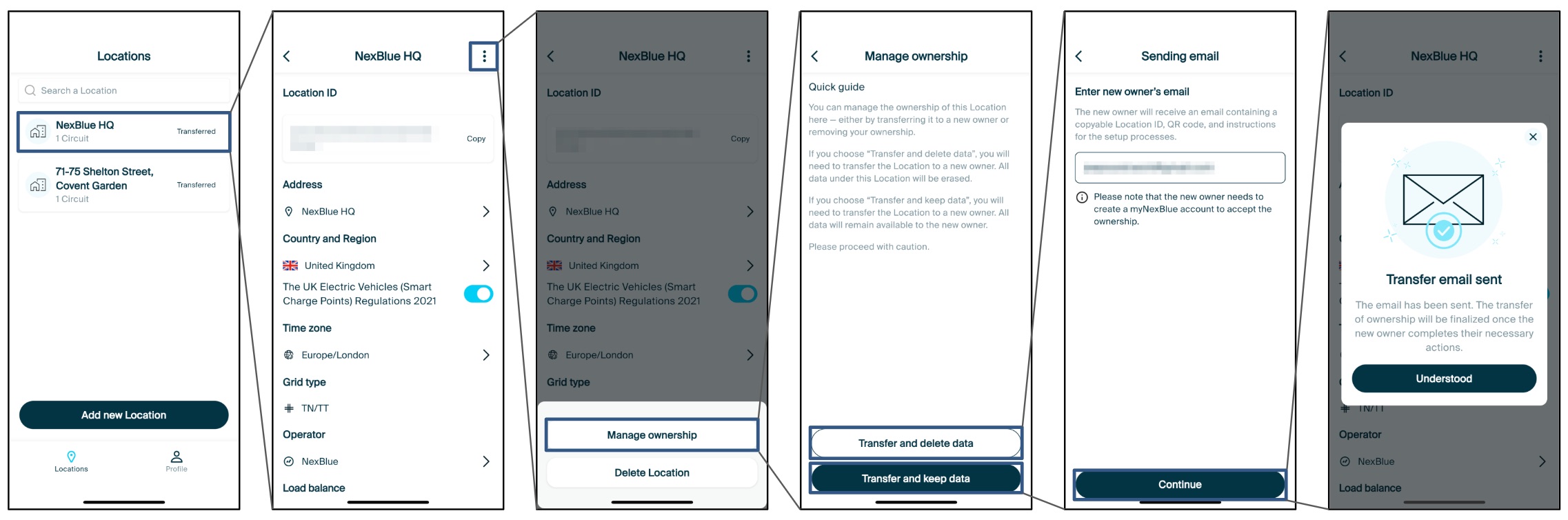
Sådan overfører du ejerskabet som installatør (i NexBlue -appen)
Følg nedenstående trin i NexBlue -appen for at overføre en placering fra en slutbruger til en anden slutbruger. Når trinene er gennemført, skal den nye ejer følge denne vejledning for at tilføje placeringen i myNexBlue-appen. Indtil den nye ejer tilføjer placeringen, vil den stadig blive vist i den oprindelige ejers myNexBlue-app.
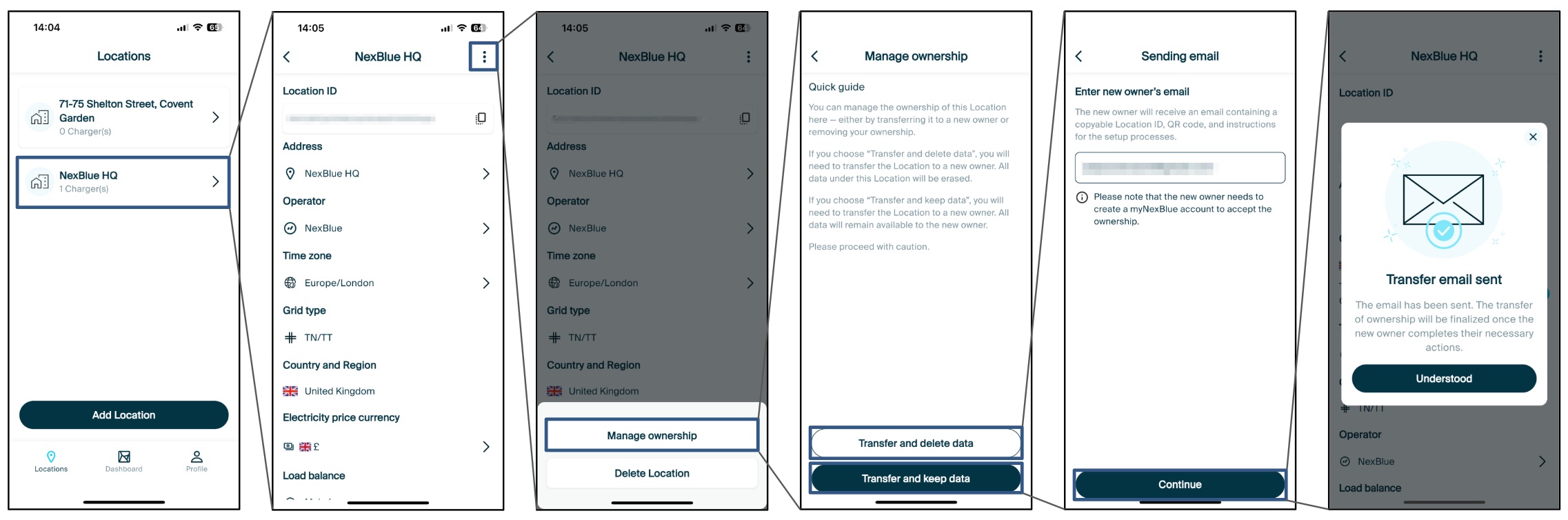
Sådan overfører du ejerskabet som ejer (i myNexblue-appen)
Følg nedenstående trin i myNexBlue for at overføre en placering fra en slutbruger til en anden slutbruger. Når trinene er gennemført, skal den nye ejer følge denne vejledning for at tilføje placeringen i myNexBlue-appen. Indtil den nye ejer tilføjer placeringen, vil den stadig blive vist i den oprindelige ejers myNexBlue-app.
Opdateret den 18. maj 2026